Claude Cowork vs. Claude Code: Why Product Leaders Shouldn't Get Stuck at Cowork
Feb 02, 2026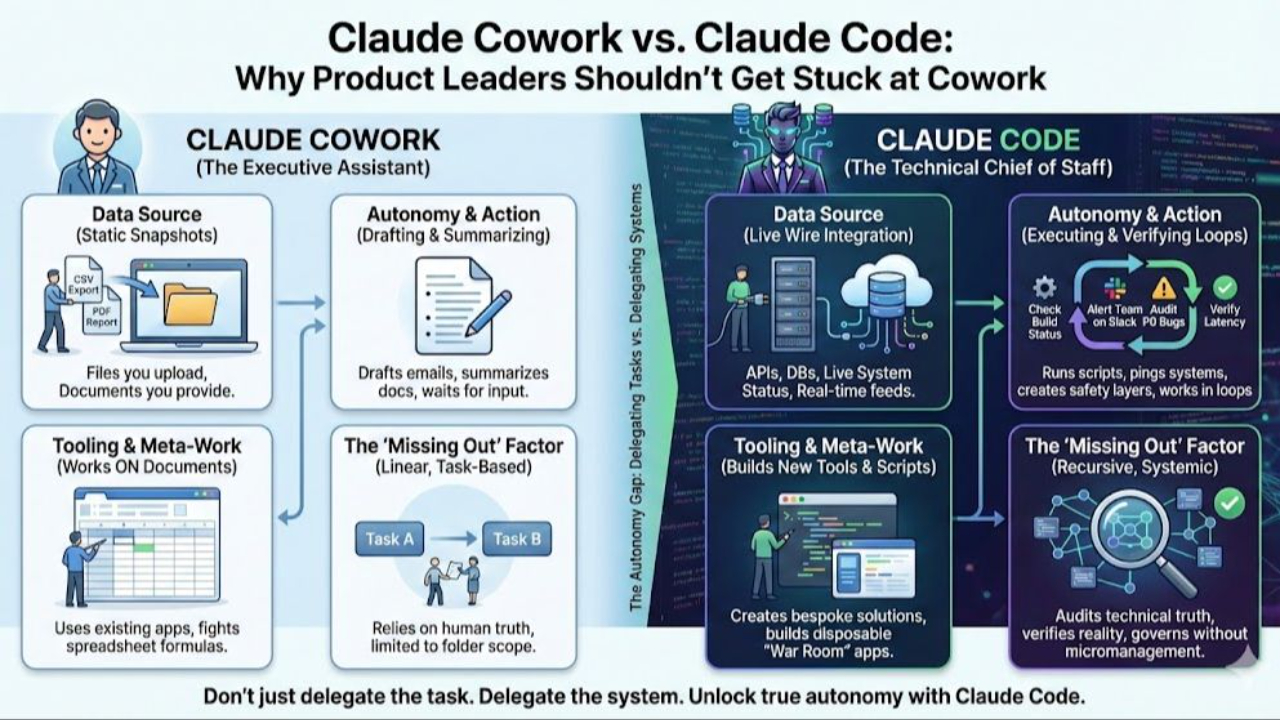
Claude Cowork vs. Claude Code: Why Product Leaders Shouldn't Get Stuck at Cowork
Don't just delegate the task. Delegate the system.
Updated February 2026
Last month, Anthropic launched Claude Cowork and everyone celebrated. A friendly desktop app! No command line! Finally, AI for the rest of us!
Product managers and even execs, I'M BEGGING YOU: don't stop there.
Cowork is genuinely useful. It's a great executive assistant that can draft emails, summarize documents, and help you think through problems. But if you stay there, you're missing the bigger shift — and you'll feel it six months from now when you realize everyone else has moved on.
The real transformation isn't Cowork. It's Claude Code.
The Gap Most Leaders Don't See
Here's the uncomfortable truth: Cowork and Claude Code aren't just different interfaces. They represent two completely different relationships with AI.
Cowork makes you an AI user. You have a capable assistant who helps you do work. You're still the one doing the work — just faster, with help.
Claude Code makes you an AI builder. You have a technical chief of staff who helps you design systems that automate work — not just for today, but next time as well. You're not just completing tasks; you're creating workflows that run without you.
That's not a small difference. That's the difference between using a tool and building an engine.
Let me show you what I mean through four product scenarios.
Scenario #1: The Weekly Business Review
In Cowork:
You connect Cowork to Slack and Jira via connectors. "Pull the latest from #incidents." It does. "Now check the sprint board." It does. "Summarize the support tickets." Done. You have a nice summary for your Monday meeting. Very spiffy!
Next Monday, you do it all again. Same conversation, same steps, same 20 minutes of your time.
In Claude Code:
You say: "Write me a script that pulls Jira velocity, Zendesk ticket volume, and the last 48 hours of #incidents — then drafts an executive summary. Schedule it to run every Monday at 8am and post to #leadership."
Code writes the script, tests it, schedules it. You test it for a few weeks to be sure you like the output, and adjust it if it needs tweaks. Over time, you trust it. Now it runs every Monday without you. You've spent a hour or two one time, instead of every week forever.
Why the gap exists: Cowork sessions end when you close the app. Code runs on your actual operating system, so it can create scheduled tasks that persist — the workflow outlives the conversation.
Scenario #2: The Competitive Intelligence System
In Cowork:
You ask Claude to research a competitor. It searches, summarizes, gives you a solid snapshot. Useful. Next week, you want an update, so you ask again. Another snapshot. You're building a collection of point-in-time analyses, but there's no continuity. Each conversation starts fresh. If you want ongoing monitoring, you are the loop.
In Claude Code:
"Build me a competitive intelligence system. Monitor Competitor X's pricing page, job postings, press releases, and App Store reviews. When something changes, log it with a timestamp and draft a 'so what' for our strategy. Run daily."
A week later, you review the log. The analysis is good, but too surface-level. So you tell Claude: "I want you to connect changes to our strategic priorities — here they are. Cross-reference against what you're seeing from Competitors Y and Z. Update your approach and re-analyze everything you've captured so far."
Claude revises its analytical framework, goes back through the accumulated data, and reprocesses it with your improved lens. The system gets sharper because you're teaching it how you think about competitive dynamics.
Why the gap exists: Cowork can't run persistent background loops — when you close the app, monitoring stops. And each session is isolated, so learnings don't accumulate. In Code, you're not just getting intelligence; you're building an intelligence system that reflects your strategic priorities and improves as you refine it.
Scenario #3: The Portfolio Prioritization Tool
In Cowork:
You drop a spreadsheet with your initiative list into Cowork's folder — effort estimates, strategic alignment scores, dependencies, resource requirements. You ask Claude to build an interactive prioritization tool. It does. Drag-and-drop interface, real-time dependency visualization, resource utilization calculations. You open it in your browser and it works.
In the exec meeting, the CEO asks "What if we kill Project Falcon?" You drag it to the cut list. Dependencies cascade. Coverage gaps appear. Two engineers suddenly unallocated. "What if we reallocate them to Lighthouse?" You drag. Numbers update. Decision made in 30 seconds instead of 30 minutes of "let me get back to you."
The meeting's a hit. Then: "Can we do this every month?" Now you're staring at the work of re-exporting data into spreadsheets before each meeting. "Can the other directors use this for their portfolios?" It's a file on your laptop. "Can it pull live from Jira instead of exports?" The sandbox doesn't allow external connections.
In Claude Code:
Same tool, but built in your actual project folder. When the CEO loves it, you're ready:
"Connect it to our Jira instance so it pulls live data." Done. "Make it accessible to the leadership team — but only them." Claude helps you deploy it with the right access controls. "Add a view for engineering capacity planning." You iterate on it next week, and the week after — each session picks up where you left off.
Six months later, it's not just a tool you built once. It's organizational infrastructure that other tools call into, that other teams rely on, that evolves as your planning process evolves.
Why the gap exists: Cowork can build this tool — that's genuinely impressive.* But the win in the meeting is just the starting point. Claude Code lets you connect to live data, share it across your team, and keep refining it over time. You're not just impressing the exec team once; you're building capability that compounds.
Scenario #4: The Evolving Operating Model
In Cowork:
You describe how you want a project organized. Cowork creates a plan and executes. Nice. Next project, you describe your preferences again. And again. Each conversation starts fresh because Cowork can't access the configuration files that would let it remember your operating model.
In Claude Code:
"Add this to my CLAUDE.md: when I start a new initiative, always create these folders, load context from these files, and ask these kickoff questions."
Now every project starts from your playbook. Your CLAUDE.md becomes your standing system prompt — the context Claude always has loaded. You add your strategic priorities so Claude weighs decisions the way you would. Your communication preferences so drafts sound like you. Your frameworks for how you evaluate opportunities, manage risk, run meetings.
When something changes — new company strategy, new team structure, new priorities — you update the file. Claude's understanding evolves with your situation.
Here's what makes this powerful: you can ask Claude "what do you know about me and how I work?" at any time. Review and update its understanding. Correct misconceptions. Add nuance. Your AI gets smarter not because of some magic algorithm, but because you're building its operating model.
When you learn something new — a better way to structure research, a checklist you always forget — you say "create a skill for this" and it becomes part of your system - not something locked in one folder. Everything compounds.
Why the gap exists: The files that control how Claude works (CLAUDE.md, Skills, project configuration) live in your file system. Code works directly with these files as part of your workflow — constantly improving how the system works. Cowork runs in an isolated environment without access to this configuration layer.
The Real Difference: AI User vs. AI Builder
Here's what it comes down to:
Cowork keeps you in the "using AI for stuff" category. Yes, it adds file access and connectors. But fundamentally, you're still having conversations to get work done. Each session is independent. Nothing compounds.
Claude Code develops your systems thinking. Your learning evolves as you use it. You start to recognize patterns: "I do this every week — that should be a script." "I explain this to Claude every time — that should be in my CLAUDE.md." "This workflow is messy — let me redesign it."
The compounding effect is real. Every workflow you capture, every skill you create, every improvement to your operating model — it all accumulates into an increasingly capable system around you.
That's the real breakthrough: not just doing work faster, but building systems that grow with you.
Who Should Use What
Stay with Cowork if: You need a capable assistant for bounded, single-session tasks. Summarize this doc. Draft this email. Analyze this spreadsheet. Cowork is genuinely great for this — friendlier interface, no setup, just start talking.
But know what you're trading off: every session starts fresh. Your AI doesn't get smarter over time. And complex, multi-step work can hit walls when context fills up — with no way to manage it.
Move to Claude Code if: You're ready to shift from completing tasks to building systems. You want workflows that persist. You want an AI that learns your operating model. You want the compound effect.
Yes, there's a learning curve. Terminal-based tools can feel intimidating if you've never used them. That's real. But it's a few hours of adjustment, not weeks of struggle. Resources like Ally K. Miller's beginner tutorial or Claude Code for PMs (a free interactive tutorial built by Carl Vellotti) can walk you through it. And if you want a friendlier interface that still gives you Claude Code's full power under the hood, check out Nimbalyst — it's my current favorite.
One important note: Cowork's guardrails exist for good reason — the sandbox protects you from unintended consequences. Claude Code gives you more power, which means building trust incrementally. Don't grant broad permissions without understanding what you're approving. Start conservative, review what Claude is doing, and expand access as you get comfortable. Claude Code can walk you through recommended permission levels as you go.
The gap between AI users and AI builders is widening. Cowork keeps you on the first side. Code moves you to the second.
The learning curve is worth it. Which side do you want to be on in six months?
This Productivity Shift Is Too Big to Ignore
The engineering crowd is already there. They started at 2x productivity. Then 4x. Now the best of them are talking about 10x — not as hype, but as lived experience.
This shift matters so much that I'm insisting our new AI Career Boost Blueprint cohort kicks off with a workshop: Claude Code for Product Leaders. Not as an add-on: As the foundation. Because the mental shift from AI user to AI builder is the most important shift product leaders can make right now.
Want to go deeper?
- Watch the masterclass replay to see the full framework in action
- Join our next Blueprint cohort — we kick off February 10th, but our first Claude Code Workshop is this weekend. Join now and be flying by next week.
Further Reading
- How Technical Do AI Product Leaders Need to Be? — Why you don't need to code, but you do need technical depth
- Leading Like a Builder — The player-coach playbook for AI product leadership
Polly Allen is the founder of AI Career Boost and host of The AI Product Leader podcast. She led the first generative AI answers on Amazon Alexa in 2020, before ChatGPT made any of it mainstream, and built the AI Career Boost Blueprint — an 8-week program for product leaders from Staff and Senior Manager to CPO, becoming indispensable AI player-coaches. Subscribe to The AI Player-Coach newsletter → · Join the next live masterclass →
Technical Notes: Why These Gaps Exist
For readers who want the details — and to preempt the "well actually" crowd:
*Cowork's sandbox — what it can and can't do:
Cowork can build impressive interactive tools. Drop a spreadsheet in the folder, ask for a visualization, and you'll get a working HTML/JavaScript app you can open in your browser. For self-contained tools, it's genuinely powerful.
The limits appear when you need more: external data connections are blocked (no pulling from Jira or live APIs), each session starts fresh (no iterating across weeks), and the output lives only on your machine (no team deployment). Claude Code removes these constraints — you can connect to real data sources, refine tools over time, deploy them for your team, and compose them into larger systems.
The fundamental architecture difference:
Cowork runs inside a lightweight Linux virtual machine on your Mac, using Apple's Virtualization Framework. This sandbox keeps things safe — Claude can't accidentally delete your system files or access sensitive data outside your selected folder. But it also means the environment is ephemeral: when you close the app, any running processes, scheduled tasks, or system-level changes vanish.
Claude Code runs directly in your terminal with access to your actual operating system. Same Claude, but with the ability to interact with your real file system, run persistent processes, and create automations that outlive the conversation.
Why scheduling works in Code but not Cowork:
Claude Code can create cron jobs (Linux/Mac) or Task Scheduler entries (Windows) because it's operating on your actual machine. When Code writes a script and schedules it, that schedule lives in your OS — it runs whether Claude is open or not.
In Cowork, any scheduled task would exist only inside the ephemeral VM. When you close the app, the VM stops, and your "scheduled" task disappears.
Why configuration doesn't cascade in Cowork:
Claude Code uses a hierarchical configuration system. You can have a CLAUDE.md in your home directory (global preferences), another in a project folder (project-specific context), and Claude loads them in order — building up context from general to specific. The .claude/ folder stores permissions, settings, and local customizations.
Cowork can read files in your selected folder, but it doesn't automatically load configuration files as inherited context, except your main top-level CLAUDE.md file. There's no cascading. Each session starts without the accumulated context that makes Claude Code feel like it "knows you." And, importantly, you can't write to files outside of the folder you're working in.
Why context management matters:
Claude Code gives you /compact (summarize the conversation and free up context space) and /clear (reset entirely). It provides clear ways to understand how much of the current context window you've used - AHEAD of starting something new and context-heavy. These commands let you manage long-running sessions — compacting when you're running low on context, preserving key information while making room for more.
Cowork doesn't expose these commands. When context fills up, the session degrades or crashes. For simple tasks, this doesn't matter. For complex, multi-step work — like synthesizing research across dozens of documents — it's a real operational limitation.
References:
- Claude Code Overview — Anthropic's official documentation
- Claude Code Sandboxing — Technical deep-dive on how the sandbox works
- Cowork Getting Started — Anthropic's Cowork documentation